
R789 Game Download APK (Real Earning App In Pakistan) 2026
| Developer | R789.com |
| Updated | 2:10 PM |
| Size | 7.8 MB |
| Version | v1.7.8.9 |
| Requirements | Android 5+ |
| Downloads | 7000 |
| Get it on |  |
Description
Introduction of R789 Game
Mobile entertainment continues to attract people who prefer using smartphones during their free time. Many users explore different applications to find games with simple controls and organised menus. R789 Game is another name that users may encounter while searching for Android gaming options.
Before installing this application users should learn about its available services. A clear understanding of the platform can help them make better decisions. Moreover checking the source and developer information is important when downloading an APK file.
This guide provides a separate overview of R789 APK. It focuses on application details and user considerations rather than making unsupported claims about its performance or rewards. XC777 GAME.
What Is R789 Game?
R789 Game is a name associated with an online mobile gaming platform. It is intended for users interested in exploring digital gaming services through an Android device.
The platform’s actual game selection and account facilities should be checked through its current application. Different versions may contain different options.
Users should also understand the rules before participating in any game. If the application offers financial features then reading the payment terms is especially important.
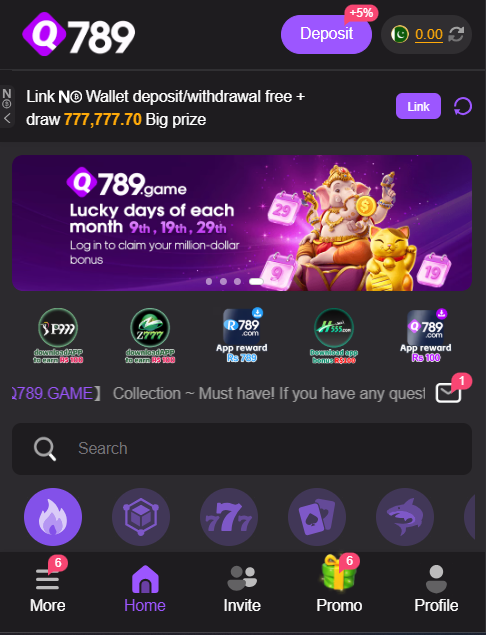
How R789 Game Works
R789 Game can be explored through its available application sections. Users should first open the main interface and review the options displayed on the screen. If account access is required then users can follow the registration instructions. After accessing the platform they can explore the available games and read their rules. Payment and withdrawal services should be considered separately from ordinary gameplay. Always check the displayed conditions before using these services.
Main Interface and Dashboard
The dashboard is an important part of a mobile gaming application. It helps users locate different sections without unnecessary confusion. A well-organised dashboard may contain game options and account controls. It may also display payment information and promotional announcements. Users should examine the actual R789 dashboard before using any option. Clear labels and understandable instructions can make navigation easier.
Key Features of R789 Game
The following sections explain the main features users should examine while reviewing R789 App.
Easy Account Access
Account access helps users manage their personal profiles. A clear login section can make it easier to enter an existing account.
Game Selection
A game selection area allows users to explore available entertainment options. Players should read the rules before selecting a game.
Simple Interface
A simple interface makes different application sections easier to understand. Clear buttons and readable text can improve the experience.
QR Payment Options
QR payment options can provide a convenient way to complete transactions when supported by the platform. Users should check the displayed EasyPaisa and JazzCash payment instructions before proceeding.
Withdrawal Facility
A withdrawal section can explain how users request payments. Users should review the amount limits and processing conditions before submitting a request.
Account Verification
Account verification helps a platform check user information. Users should follow the actual verification instructions and never share passwords or OTP codes with other people.
Mobile Access
Mobile access allows users to explore the application through an Android phone. Performance depends on the device and software requirements.
Support Information
Support information can help users understand account and technical issues. Always use contact details provided through a reliable platform source.
Game Categories & Entertainment
Game categories help users understand the available entertainment choices. Different applications may provide separate sections for different playing styles.
R789 users should explore the actual game list and read the instructions for each option. Understanding the rules can help prevent confusion during gameplay. Do not assume that every advertised game is available in the current version.
Navigation & User Experience of R789 Game
Navigation plays an important role in application usability. Users should be able to locate account settings and game options without difficulty. Clear menu names can help beginners understand the platform. Furthermore readable instructions make important services easier to follow. Always check the purpose of a button before selecting it. This is particularly important in account and payment sections.
Graphics & Mobile Performance of R789 Game
Graphics affect how users view and interact with an application. A balanced layout can make important information easier to read. Mobile performance also depends on internet speed and available device storage. Users should close unnecessary background applications if they experience slow performance. Check the actual application on your device before expecting a particular visual experience.
R789 Game for Pakistani Users
Pakistani users often look for mobile applications with familiar payment services and simple account access. However payment availability should always be checked directly.
Users should carefully review any EasyPaisa or JazzCash instructions. They should confirm the payment receiver and transaction amount before sending funds. It is also important to understand local laws and the platform’s terms before using financial gaming services.
Getting Started With R789 Game
New users should begin by checking the application source. Read its description and examine the available information about the developer. Next review the registration instructions and privacy policy. If the application contains payment features then understand their conditions before making a transaction. Take time to explore the interface before using any unfamiliar service.
Account Profile & Settings of R789 Game
The profile section helps users review their account information. It may include personal details and security options. Users should check the available settings and update information only when necessary. If identity verification is requested then review the instructions carefully. Avoid uploading sensitive documents through unknown links. Use only the platform’s genuine verification section.
R789 Game APK Download
An APK file is used to install Android applications manually. Before downloading R789 APK users should check the source and application details. Review the file information and developer name. Also check the version number and Android requirements. Avoid modified APK files that advertise unlimited rewards or special account benefits. Use security scanning tools and pay attention to Android warnings before installation.
Installation Process for Android
Android users can follow these general installation steps after checking the APK source.
- Download the APK file from a trusted source.
- Open the downloaded file.
- Review the installation information.
- Allow installation from the selected source only if trusted.
- Follow the instructions on the screen.
- Open the application after installation.
- Disable unknown-app installation permission when finished.
Never ignore security warnings without understanding their meaning.
R789 Game Registration Tips
Registration is the process of creating a new account on App. Open the registration page and enter the details requested by the application. Create a strong password and review your information before submitting it. Follow the displayed verification instructions to complete the process. Never share your password or OTP with another person.
R789 Game Login
Login allows registered users to access their accounts. Open the login section and enter your registered details correctly. If you forget your password then use the available recovery option. Check the account information after login and keep your password private. Always use the correct application or website when accessing your account.
App Permissions & Compatibility
Application permissions determine which phone functions an app can access. Users should review every permission before allowing access. Check whether the requested permissions match the application’s purpose. Also review the Android version and storage requirements. Avoid giving access to contacts and messages without a clear reason. Keeping unnecessary permissions disabled can improve privacy.
Deposit Options & QR Payment Methods
The deposit section is important for users who want to understand the platform’s payment process. QR payments can make transactions easier when the service supports them.
Users should check the available QR instructions and payment details. Before confirming a transaction compare the receiver information with the details displayed by the platform. Keep the transaction receipt for your records. Do not send money to personal accounts shared through unofficial messages.
EasyPaisa QR Deposit Information
EasyPaisa QR is a payment method that users may look for when checking local deposit options. A QR code can help a user open the payment details through a supported mobile wallet. Before completing a payment check the receiver name and amount. Confirm the information displayed in your EasyPaisa application and keep the transaction receipt. The actual availability of EasyPaisa QR deposits on R789 should be confirmed through its current payment screen.
JazzCash QR Deposit Information
JazzCash QR payments can provide a convenient transaction method when supported by a service. Users should open the payment section and follow the instructions displayed there. Check the QR code and receiver information before confirming the transaction. Make sure the amount is correct and save the payment confirmation. Never scan a QR code received from an unknown person. Always verify the payment destination before transferring money.
Withdrawal Process & Payment Speed of R789 Game
Withdrawal services allow users to request payment from an account when the platform supports this facility. Before submitting a request check the available withdrawal methods and minimum amount.
Also review processing time and any applicable conditions. Users should make sure their account information matches the payment details. Fast withdrawal claims should be checked through genuine completed transactions. Keep the transaction reference and confirmation message for future records.
Bonuses & Promotional Offers of R789 Game
Promotional offers may provide information about special events or available rewards. Users should read the complete conditions before accepting an offer.
Check expiry dates and eligibility requirements. Also understand whether a promotion has any payment or withdrawal restrictions. Never trust a reward message that asks for an unexplained payment or personal verification code.
Security & Account Verification of R789 Game
Account verification is an important part of online platform security. It may involve checking account details or confirming ownership through an approved method.
Users should follow the instructions provided by the platform. Never share passwords and OTP codes with customer support or other users. Check the website address before entering personal details. Also avoid suspicious links that imitate the application login page.
Privacy & User Protection
Privacy protection helps users control their personal information. Read the privacy policy before creating an account. Check what information the platform collects and how it uses that information. Also review the permissions requested by the Android application. Use a unique password and avoid saving sensitive details on shared devices. If you notice unusual account activity then take appropriate security steps.
Pros & Cons
Pros of R789 Game
The following points describe possible advantages to consider when reviewing the platform.
- Mobile-based gaming access
- Easy account navigation if supported
- Local payment options if available
- QR payment convenience if supported
- Account management facilities
- Different entertainment options if available
Cons of R789 Game
Users should also consider possible limitations before using the application.
- Current developer details require confirmation.
- APK version information needs checking.
- Payment conditions should be reviewed.
- Withdrawal processing depends on platform rules.
- Third-party APK files can create security risks.
- Promotional offers may include restrictions.
( FAQs )
What Is R789 Game?
R789 Game is a mobile gaming platform name that users can explore through its available application and services.
Does App Support EasyPaisa QR?
Check the current deposit section for EasyPaisa QR availability and verify the receiver details before making a transaction.
Does App Support JazzCash QR?
Users should check the actual payment section for JazzCash QR instructions and confirm the payment destination.
How Can I Register on R789 Platform?
Open the registration page and follow the displayed instructions. Use a strong password and complete the required verification process.
How Can I Withdraw Money From R789 App?
If withdrawal services are available then open the withdrawal section and review the amount limits and processing conditions before submitting a request.
Is Application Safe for Android Users?
Review the application source and permissions before installation. Also check its privacy policy and account security information.
Conclusion
R789 Game is a mobile gaming platform that users may explore for digital entertainment and account-based services. Its application interface and available options should be checked before installation. Payment facilities deserve particular attention. EasyPaisa QR and JazzCash QR instructions should be checked against the actual payment screen. Similarly users should confirm withdrawal conditions and transaction completion rather than relying only on fast-payment advertisements. Account security also matters. Use strong passwords and follow the platform’s verification instructions carefully. Finally download applications from trusted sources and make informed decisions before using any financial service.
Customer Support and Technical Help
Customer support can help users understand account procedures and technical problems. Look for the support option inside the application. Before contacting support prepare the relevant error message or transaction reference. Do not send passwords or OTP codes. Always confirm that a support account belongs to the actual service. Avoid people who promise guaranteed rewards or withdrawals in exchange for extra payments.