
K55 Game APK Download Latest Earning App In Pakistan 2026
| Updated | A Day |
| Size | 11 MB |
| Version | v1.1.6 |
| Requirements | Android 4+ |
| Downloads | 43000 |
| Get it on |  |
Description
K55 Game is a mobile gaming platform for users who enjoy playing games on their smartphones. Android users may find different gaming options and account tools on the platform. In Pakistan, mobile gaming can be convenient because smartphones are easy to carry and use at home or while travelling.
However, users should check the platform carefully before getting started. First, review the game rules, APK download source, app permissions, payment options, and account security. Also, read the terms and conditions before using any features that involve money.
This guide explains K55 Game in simple English. It covers the platform’s features, available games, registration, APK download, login, payments, withdrawals, safety checks, and common problems. In addition, it explains why responsible gaming matters. CLICK HERE
What Is K55 Game?
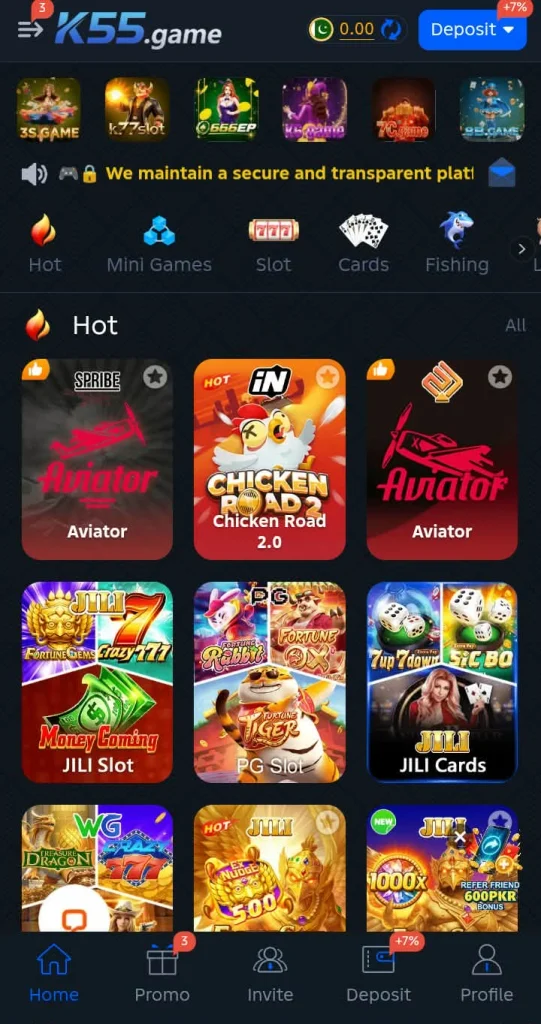
K55 Game is a name associated with a mobile gaming platform. It may offer different games that users can access through a smartphone. However, the available games and features can change over time. Therefore, users should check the current platform details before getting started.
Depending on the available service, users may be able to access the platform through a web browser or install an Android APK. Before downloading any file, verify its source and check the app permissions. Do not assume that an APK is available unless a verifiable download option is provided.
Using the platform may involve opening available games and exploring the features offered in the current version. Some versions may also provide account tools, rewards, or payment options, but these features require verification.. PKR365 Game
Main Key Features of K55 Game
The features can change with time. Therefore, users should check the current version before using any feature.
Mobile Friendly Interface
A mobile friendly interface can make the platform easy to use on a phone. For example, simple buttons can help new users move around the app or website.
Different Games
A gaming platform may have different game types. As a result, users may have more choices when they want to play.
Simple Navigation
Simple menus can help users find games, account settings, and other sections. Therefore, good navigation can be helpful for beginners.
Account Management
Users may get account tools for changing or checking some account details. However, the exact account options depend on the current platform.
Rewards and Promotions
Some gaming platforms may show promotions or daily rewards. However, users should read the rules first because there may be conditions.
Payment Options
Some platforms may have payment tools. Still, you should only use payment methods that are clearly shown by the platform.
Games Available on K55 Game
The game list can change. Because of this, users should check the current game section before playing.
Card Games
Card games use cards as the main part of the game. Some card games are easy to learn, while others can have more rules. Therefore, before playing, learn how the game works. Also, check if the game uses money or credits.
Arcade Games
Arcade games can be simple and quick. In many cases, they may use easy controls. Therefore, they can be suitable for users who like short game sessions.
Other Mobile Games
The platform may have other types of mobile games too. However, the list can change when new games are added or old games are removed. So, check the current game menu for the latest information.
K55 Game Registration Guide
Registration is usually simple. However, you should still be careful with your personal information.
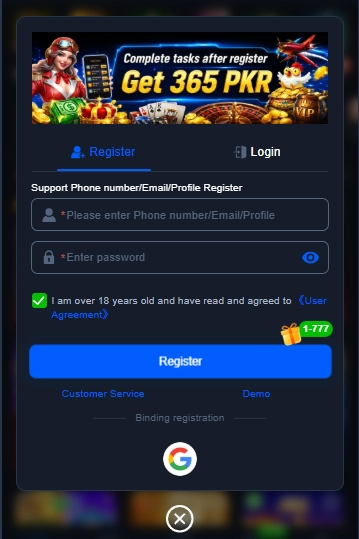
Open the Platform
First, open the correct K55 platform from a source that you can check.
Press Register
Next, find the Register or Sign Up button and open it.
Enter Your Details
Then, enter the information that the platform asks for. After that, check your information before you submit it.
Make a Password
Now, make a strong password for your account. For example, do not use your name or phone number as an easy password.
Complete Verification
The platform may ask you to verify your phone number or other information. If so, follow the steps shown on the platform.
Log In
Finally, log in to your account. Then, check your account settings and make sure everything looks correct. Most importantly, never share your password or OTP with another person.
K55 Game APK Download and Installation
APK means an Android application file. If K55 provides an APK, check the source before downloading it. Do not download an APK from every website that shows the K55 name. Otherwise, you may download a file that has been changed or is unsafe.
Before installing an APK, check these things:
- Where the APK comes from
- App version
- File information
- App permissions
- Developer information
- Security warnings
If the APK comes from a source you can verify, follow the normal Android installation steps. However, your Android phone may show a warning when you install an APK from outside an app store. In that case, do not ignore the warning. Instead, check the source of the file first. Also, avoid cracked or modified APK files. Such files can be changed by other people and may cause security problems. Finally, do not say that K55 is on Google Play unless you can confirm a real and current Google Play listing.
Deposit and Payment Methods of K55 Game
Payment methods can be different on different gaming platforms. Therefore, you should check the current payment page before making a deposit. People in Pakistan may look for Easypaisa, JazzCash, or bank transfer. However, you should not assume that K55 supports these methods.
If a deposit option is available, the steps may be like this:
- Open Wallet or Cashier.
- Press Deposit.
- Select a payment method.
- Enter the amount.
- Check the details.
- Confirm the payment.
Before sending money, check the account name, number, amount, fees, and limits. Also, do not send money to a person just because they say they work for the platform. Furthermore, do not expect every payment to be processed at the same speed.
K55 Game Withdrawal Process
If K55 offers a withdrawal option, read the rules before making a request.
The steps may look like this:
- Open Wallet.
- Press Withdraw.
- Select a payment method.
- Enter the required details.
- Enter the amount.
- Check your information.
- Send the request.
- Wait for processing.
The minimum withdrawal amount may be different for different platforms. Also, the platform may ask for account verification. In addition, fees and processing times can also be different. Therefore, never trust someone who promises you a guaranteed withdrawal time.
Is K55 Game Safe?
You should check safety before using any gaming platform. First, check where the APK comes from. For example, a file from an unknown website can be risky. Next, check the permissions of the app. If an app asks for permissions that you do not understand, stop and learn more. You should also read the privacy policy if one is available. The privacy policy can tell you how your information may be collected and used. In addition, your account also needs protection. Use a strong password and keep your OTP private. If you use payment features, read the payment rules first.
You should check:
- APK source
- App permissions
- Privacy policy
- Terms and conditions
- Account rules
- Payment rules
- Withdrawal rules
- Customer support
- Age rules
Therefore, do not call any gaming platform 100% safe without proper proof.
User Experience of K55 Game
The user experience can depend on the platform, phone, and internet connection. For example, a simple design can make it easy to find games. Clear buttons can also help new users. However, loading speed can be different on different phones. Also, a slow internet connection can make a game or page load slowly. Therefore, users should not always blame the app for a slow connection.
The number of games can also affect the user experience. Some people like many choices, while others like a simple game list. In addition, account tools should be easy to find. Still, not every feature may work for every user. For example, some games and payment methods may depend on the account or region.
Pros and Cons of K55 Game
| Pros | Cons |
|---|---|
| Made for mobile users | Features can change |
| May offer different games | Game list should be checked |
| Simple menus may help beginners | Payment options may differ |
| Account tools may be available | APK source needs checking |
| Game rules can be checked before use | Some features may need verification |
Tips for Using K55 Game Responsibly
Gaming should be treated as entertainment. Therefore, do not think of gaming as a guaranteed way to make money. First, set a spending limit before using a paid game. Never use money that you need for food, bills, rent, school, or other important needs. Next, read the game rules before playing. Also, do not play because someone tells you that you will win.
Keep your password private. Likewise, never share your OTP with another person. Stay away from strange links and unknown APK files. If you lose money, do not keep spending more just to get it back. Instead, take a break and stop for some time. Finally, follow the platform rules and the laws that apply to you.
Common Problems and Solutions of K55 Game
Login Problem
First, check your phone number, username, and password. If you forgot your password, use the password recovery option if it is available.
Verification Delay
Check if the platform needs more information from you. Also, make sure the information you gave is correct.
APK Does Not Install
Check the APK source and file. Also, check whether the APK works with your Android phone. If Android shows a security warning, check the file source before you continue.
Payment Is Delayed
Check the payment status. Then, look at the transaction details and keep your transaction record if you have one.
Withdrawal Is Pending
Check the withdrawal rules. In some cases, the platform may need verification before processing the request.
App Crashes
Close the app and open it again. Also, check your internet connection. If the problem continues, check whether a newer version is available from a legitimate source.
Forgotten Password
Use the platform’s password recovery option. Never give your password to a person who says they can recover your account.
FAQs of K55 Game
How do I register on K55?
Open the correct platform, press Register, enter the requested details, make a password, and complete verification if needed.
Is app available for Android?
Check the current platform information to see if an Android app or APK is available.
How can I install the K55 APK?
If a real APK is provided, download it from a source you can check. Then, follow the Android installation steps.
Does app support Easypaisa?
You should check the current payment page. Do not assume that Easypaisa is available.
Does app support JazzCash?
Check the current payment options to see if JazzCash is supported for your account.
How do withdrawals work?
If withdrawals are available, open Wallet, choose Withdraw, select an available method, add the required information, and send the request.
Conclusion
K55 Game is a mobile gaming platform that Android users may explore on their smartphones. However, its games and features may change over time. Therefore, check the current platform details before getting started.
Before registration, review the APK source, game rules, payment methods, withdrawal conditions, privacy policy, and customer support options. Pakistani users should also verify whether Easypaisa, JazzCash, or bank transfers are currently supported. Do not assume that these payment methods are available without confirmation.
Account security is equally important. Keep your password and OTP private, avoid suspicious payment links, and do not install APK files from unknown or unverified sources.
Download links
How to install K55 Game APK Download Latest Earning App In Pakistan 2026 APK?
1. Tap the downloaded K55 Game APK Download Latest Earning App In Pakistan 2026 APK file.
2. Touch install.
3. Follow the steps on the screen.