
88KA Game Real Earning App In Pakistan Latest Version 2026
| Updated | Now |
| Size | 15MB |
| Version | V4.4 |
| Requirements | Android |
| Downloads | 765+ |
| Get it on |  |
Description
The 88KA Game is a mobile gaming application designed for Android users who want access to different entertainment options through one platform. Its simple layout and mobile-focused design can make navigation easier for both new and experienced users. Pakistani users who are exploring gaming platforms may find its registration, login, and account sections straightforward to understand.
Before installing any APK, however, users should check the source carefully. Apps obtained outside the Google Play Store can carry security risks if downloaded from unreliable websites. It is also important to review the platform’s terms, age requirements, payment rules, and local laws before using any feature involving money.
This guide explains the platform in simple language. It covers the 88KA Download process, account registration, login, key features, bonuses, mobile compatibility, and important safety considerations. For More Games CLICK HERE
What Is 88KA Game APK?
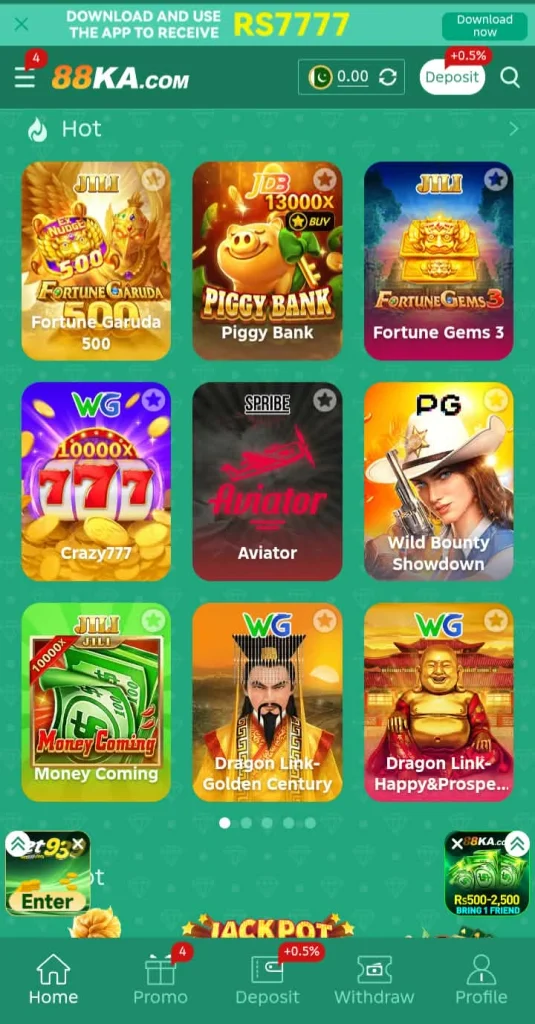
The platform is an Android application that brings several digital gaming options into a single mobile interface. Instead of using different applications for different types of games, users can explore available categories from one account.
The platform is primarily aimed at mobile users. Therefore, its interface is generally structured around touch controls, quick menus, and account-related sections that are easy to access from a smartphone.
For Pakistani Android users, convenience is often an important factor when choosing a gaming application. A lightweight interface can be useful on mid-range devices, especially when users have limited storage or mobile data.
Why Are Users Interested in 88KA Game Pakistan?
The Pakistani mobile gaming market includes many applications offering different types of digital entertainment. Users generally look for platforms that provide simple navigation, multiple game choices, and convenient account management.
The app attracts attention because it brings several functions together rather than requiring users to move between multiple applications.
Another reason is its mobile-oriented experience. People who regularly use smartphones may prefer an application that provides quick access to their account, game categories, and available options. You May also Like This 718SP Game
88KA Game Key Features
The 88KA Key Features can vary depending on the current version of the application. However, users generally expect a modern gaming platform to provide several basic functions.
Multiple Gaming Options
A major attraction of gaming platforms is having different entertainment categories within one application. Depending on the version available to users, the platform may include several game formats.
Mobile-Friendly Interface
The application is designed around smartphone use. Clear menus and touch-friendly controls can help users move between different sections without spending too much time learning the interface.
Account Dashboard
Registered users can normally access account-related functions from a central dashboard. Such sections may include profile information, available balance, account settings, activity details, and other available services.
Android Compatibility
The APK format is intended for Android devices. Compatibility can depend on the Android version, device specifications, and the particular application release.
Quick Navigation
Good mobile applications keep important sections easy to find. A well-organized menu can reduce unnecessary steps when users want to access games, account settings, or support.
88KA Game Download Guide
Users searching for 88KA Game Download should first identify a trustworthy source. Since APK files can be installed outside the Google Play Store, downloading from an unknown website is not recommended.
A safer approach is to verify the publisher, application name, file source, and available security information before installation.
How to Download the APK
The general process is straightforward:
- Visit a trusted source that provides the current APK.
- Check the application name and version.
- Review the file information before downloading.
- Download the APK only if the source appears legitimate.
- Scan the downloaded file with a reputable mobile security tool.
- Continue with installation only after checking the permissions.
Do not install an APK simply because it promises special rewards or unusually high returns. Such claims can be misleading.
How to Install the Application on Android
After completing the APK Download, users need to install the file on their Android device.
Android may block installation from sources outside the Play Store. If this happens, the device may provide an option allowing installation from the specific browser or file manager being used.
The exact settings differ between Android versions and manufacturers.
Installation Steps
- Open the downloaded APK file.
- Review the installation prompt.
- Allow installation from the relevant source only if you trust it.
- Follow the instructions displayed on the screen.
- Wait until installation finishes.
- Open the application and review its permissions.
For security reasons, users should avoid leaving unknown-source installation enabled permanently. Disable the setting again after completing the installation if it is no longer required.
88KA Game Register Process
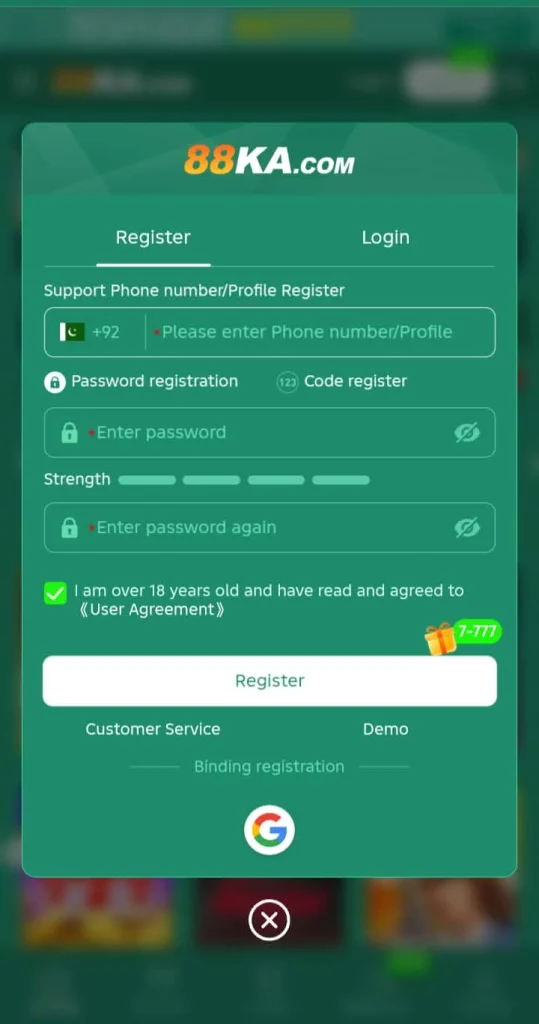
New users normally need to create an account before accessing account-specific features. The Game Register process may ask for information such as a mobile number, username, password, or verification details.
The exact registration form can change with different versions of the platform.
Steps to Create an Account
- Open the installed application.
- Select the registration or sign-up option.
- Enter the requested information carefully.
- Create a strong and unique password.
- Complete any required verification.
- Review the platform’s terms and privacy information.
- Submit the registration form.
Never share your password or verification code with another person. Also, avoid using the same password that protects your email, banking, or other important accounts.
88KA Game Login Guide
Once registration is complete, returning users can use the App Login section to access their account.
Usually, users enter their registered login details and then select the login button. Some versions may include additional verification for account protection.
If you cannot log in, first check whether the username and password were entered correctly. Also confirm that your internet connection is working.
Forgot Your Password?
If a password is forgotten, use the platform’s official recovery option rather than asking another person for assistance.
Never give your password, OTP, or verification code to someone claiming to be a customer-support representative through an unofficial social media account or messaging service.
88KA Game Bonuses and Promotions
The App Bonuses section may contain promotional offers that change according to the platform’s current policies. These can sometimes include welcome promotions, activity-based rewards, referral programs, or other incentives.
Users should read the complete terms before accepting any promotion.
A bonus may have conditions involving eligibility, minimum requirements, expiry dates, or usage restrictions. Therefore, the headline description alone may not explain the complete offer.
Read Bonus Conditions Carefully
Before participating in any promotion, check:
- Eligibility requirements
- Expiration date
- Minimum activity requirements
- Withdrawal or usage conditions
- Account restrictions
- Verification requirements
Users should never assume that a bonus represents guaranteed income. Gaming outcomes can involve uncertainty, and promotional offers should always be understood before participation.
Payment and Account Safety 88KA Game
Some gaming platforms may provide financial features depending on location and version. Pakistani users should be especially careful when entering payment information or sending funds through digital wallets.
Only use payment options officially supported by the platform. Check the recipient information carefully before confirming a transaction.
Do not send money to individuals who claim to be agents or representatives unless their identity and authorization can be independently verified.
Also, keep transaction records and avoid sharing screenshots that expose sensitive account information.
Is 88KA Game APK Safe?
Safety depends heavily on where the APK comes from and what permissions the application requests. An APK is simply an Android application package; the format itself does not guarantee that an app is safe.
Before installation, users should consider several factors.
Check the APK Source
Download applications only from sources you trust. Be cautious with websites that use misleading download buttons, excessive pop-ups, or suspicious redirects.
Review Permissions
An application should not request unnecessary access to personal information, contacts, messages, or files. If the requested permissions appear unrelated to the application’s purpose, reconsider the installation.
Keep Android Updated
Security updates can protect devices against known vulnerabilities. Keep the operating system and mobile security software updated whenever possible.
Protect Your Account
Use a unique password and enable additional security features if the application provides them. Never disclose login credentials to another person.
Advantages and Limitations of 88KA Game
Every mobile gaming platform has strengths and weaknesses. Looking at both sides can help users make a more informed decision.
Potential Advantages
- Mobile-focused interface
- Multiple gaming options in one application
- Straightforward registration
- Easy account access
- Android APK format
- Centralized account management
- Simple navigation for beginners
Possible Limitations
- APK installation may require additional Android settings
- Availability can vary by region
- Features may change between versions
- Third-party APK sources can create security concerns
- Promotions may include conditions
- Gaming results are not guaranteed
This balanced approach is important because no application should be treated as a guaranteed source of income.
Tips for New 88KA Game Users
People searching for app Pakistan should take a few basic precautions before creating an account.
First, confirm that the service is permitted and appropriate for your location and age. Rules surrounding online gaming and money-related services can differ by jurisdiction.
Second, use only information that belongs to you when creating an account. Do not provide fake identity details simply to bypass a verification process.
Third, set a personal spending limit if the platform includes paid features. Never use money needed for essential expenses.
Finally, remember that promotional language should not influence financial decisions. A responsible user checks the rules first and makes decisions based on realistic expectations.
Common Problems and Simple Solutions of 88KA Game
Users can sometimes encounter installation or login problems.
APK Will Not Install
Check whether the file downloaded completely and whether your Android version supports the application. A corrupted or incompatible APK may fail during installation.
Application Crashes
Restart the phone and check available storage. Keeping Android updated can also improve compatibility.
Login Does Not Work
Verify your credentials and internet connection. If the issue continues, use the official account recovery or support procedure.
Download Is Slow
A weak internet connection can affect APK downloads. Try a stable Wi-Fi or mobile-data connection and avoid downloading from suspicious mirror websites.
FAQs of 88KA Game
What is App?
It is an Android app offering different digital gaming options.
How can I download Game?
Download the APK from a trusted source and scan it before installation.
Is app available for Android?
Yes, the APK is designed for Android devices. Compatibility may vary.
How do I create an 88KA account?
Open the app, select registration, enter the required details, and create a password.
What about app bonuses?
Bonuses may vary. Always check their terms and conditions before using them.
Is it safe to install an APK?
Safety depends on the app and its source. Use trusted sources, check permissions, and scan the APK.
Conclusion
The APK offers Android users a single mobile environment for exploring different gaming options and managing an account through a smartphone. Its appeal comes from features such as mobile accessibility, straightforward navigation, and multiple entertainment categories.
At the same time, users should approach APK-based applications carefully. Download the software from a trustworthy source, inspect permissions, protect account credentials, and understand all terms before using financial features.
For Pakistani Android users, the best approach is to focus on security and responsible use rather than promotional promises. Check the latest version, confirm local requirements, and make informed decisions before installing or using the platform.
Download links
How to install 88KA Game Real Earning App In Pakistan Latest Version 2026 APK?
1. Tap the downloaded 88KA Game Real Earning App In Pakistan Latest Version 2026 APK file.
2. Touch install.
3. Follow the steps on the screen.